
CPQ for Furniture Manufacturing: Configure, Price, and Quote Custom Products
Understand how configuration rules, pricing logic, and structured quotes connect custom product requirements to an agreed order specification.

CPQ for furniture manufacturers is software for selecting valid product combinations, calculating their prices, and preparing quotes. In a B2B sales process, it answers practical questions: will these modules fit, is this finish available, and which customer terms apply to this order?
What Is CPQ for Furniture?
Hypothetical example: an office buyer needs cabinets along a 2,400 mm wall. Configure checks whether three 800 mm sections and their selected doors are allowed. Price applies section costs and finish charges. Quote records those selections, quantities, and terms for the buyer.
A 3D configurator is not essential. A drawing can show the cabinet arrangement, but it does not prove that the chosen hinges fit or that the price includes the finish. Those checks require maintained product and pricing rules.
Why Is Furniture Quoting Difficult to Manage Manually?
One change can cross several teams' responsibilities. A narrower section may require different doors and hinges; a material change may remove a finish choice. Sales needs the revised price, while the workshop needs the revised components.
Imagine design emails a four-section drawing while sales still quotes three sections. The mismatch appears only when someone compares quantities. An old spreadsheet creates another problem: today's selections may still use last month's material costs.
How Does Furniture CPQ Work From Configuration to Order?
Start with measured space and access requirements, then select a base system, dimensions, modules, materials, and finishes. Check the combination, calculate the price, and issue the quote. Record which version the customer accepts before passing its selections to the next team.
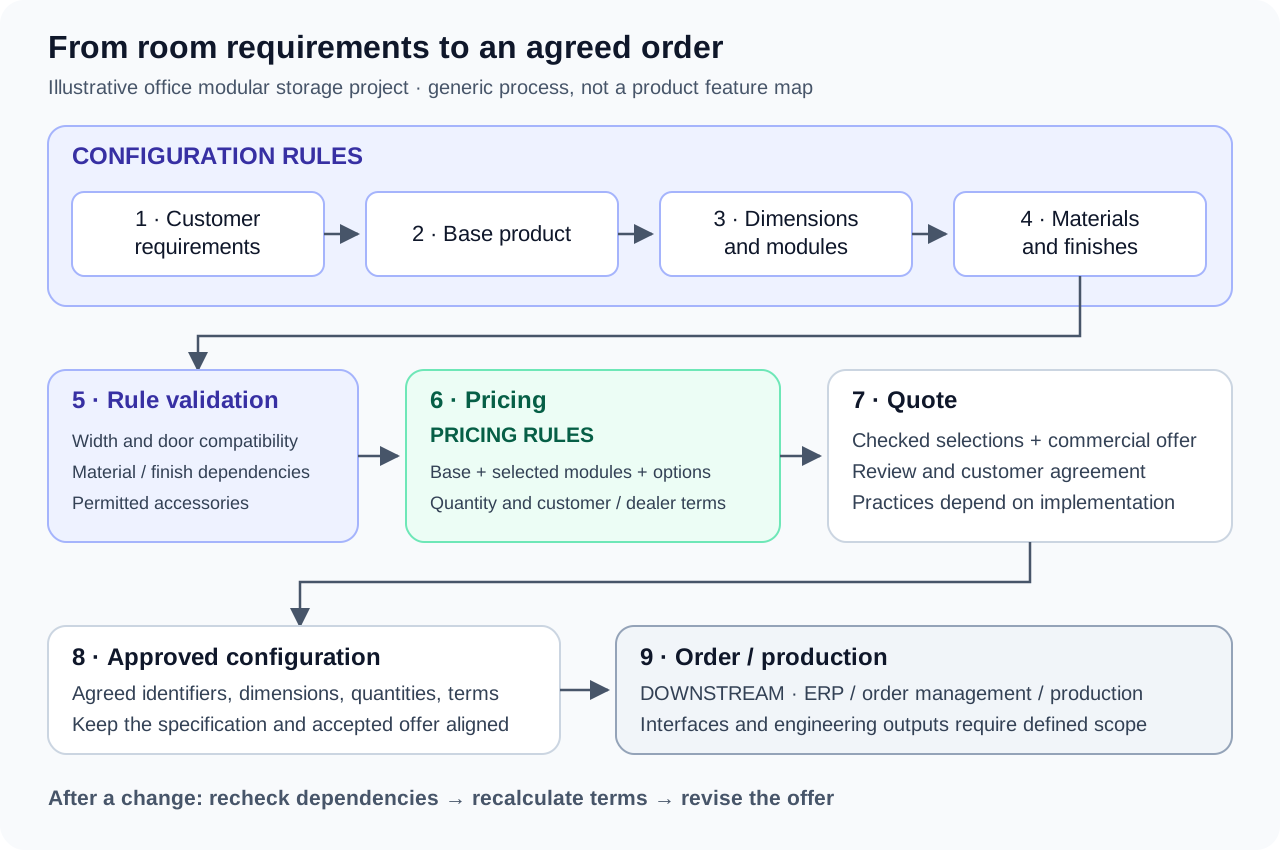
When a section changes, recheck its doors, connectors, and charges rather than editing the total alone. The deliverable is more than a PDF: operations needs section identifiers and quantities that match the accepted offer, not instructions to interpret a sketch.
Record measurements with units. Our example assumes 2,400 mm of usable space; a real survey must account for clearances and obstructions. If that measurement changes, check fit and issue a matching quote revision.
What Capabilities Matter Most in Furniture CPQ?
Use the storage project as a test case. Ask who maintains width limits, who sets finish charges, and what happens when a selection fails a check.
Product and Configuration Rules
In a hypothetical catalog, a pull-out tray might be unavailable with one hinge type. Test that exact pairing, including what happens if the seller changes the doors later. Rules cover combinations your team has defined; an unusual request outside those definitions still needs engineering judgment.
Furniture Pricing Logic
For illustration only, three sections at £180 each plus a £30 finish charge per section total £630 before delivery, installation, and tax. A useful test is whether removing one section also removes its finish charge. Then check customer terms, quantity breaks, and dealer pricing separately.
Visualization and Guided Configuration
A 2D layout or 3D view helps the buyer inspect section placement and finishes. Visual CPQ combines that representation with rules-based choices. Select the material before offering its finishes; change it afterward and check whether both the available choices and the displayed surface update.
Quote-to-Production Handoff
Check that operations receives section codes, dimensions, quantities, material and finish codes, and the accepted commercial terms. Decide who handles a code the receiving system rejects. An automatic production-ready BOM is not universal; it requires engineering definitions and a suitable interface, not just a completed quote.
CPQ vs. Furniture Configurator vs. Visual CPQ
A product configurator checks selections. CPQ adds pricing and quotation; Visual CPQ adds an interactive representation. Ask suppliers to demonstrate each step rather than relying on the category name.
| Capability | Product Configurator | CPQ | Visual CPQ |
|---|---|---|---|
| Product option selection | Core | Core | Core |
| Configuration rules | Core | Core | Core |
| Pricing rules | May be included | Core | Core |
| Quote generation | May be included | Core | Core |
| Approval workflows | Implementation-dependent | Implementation-dependent | Implementation-dependent |
| 2D / 3D visualization | Optional | Optional | Defining visual layer |
| Order data handoff | Implementation-dependent | Implementation-dependent | Implementation-dependent |
| Typical user | Buyer or product specialist | Seller or dealer | Seller, dealer, or buyer |
Where Does Furniture CPQ Deliver the Most Value?
The storage project is a useful candidate if sellers repeatedly check the same width, door, and finish dependencies. Configurable seating presents similar questions about frames and upholstery. Solutions are worth investigating when those checks recur often enough to justify maintaining the rules.
Dealers may use the same allowed combinations but different terms. Test both instead of maintaining separate rule spreadsheets. For a small fixed-price range, a simpler quoting tool may suffice.
Practical Example: Quoting a Modular Furniture Project
Return to the hypothetical 2,400 mm wall. Adding a fourth 800 mm section fails the fit check. If the sample catalog permits 600 mm sections, four can fit instead. The revised selection still needs compatible doors, connectors, and finishes; fitting the wall is only one check.
| Customer Requirement | Configuration Rule | Pricing Impact | Output Data |
|---|---|---|---|
| Fit the available wall | Four 800 mm sections exceed 2,400 mm | Price permitted 600 mm sections instead | Dimensions and module identifiers |
| Choose material and finish | Finish must match selected material | Apply applicable material and finish charges | Material and finish codes |
| Add a storage section | Section needs compatible connectors | Count four sections and their connectors | Section and connector quantities |
| Select doors and accessory | Exclude incompatible accessory | Remove excluded option charge | Valid door and accessory identifiers |
| Apply buyer terms | Use the applicable commercial conditions | Recalculate the agreed offer | Quoted price and order terms |
Using illustrative prices of £160 per narrower section and £30 per finish, the revised total is £760 before delivery, installation, and tax. Sales should show four 600 mm sections on the new quote, not simply replace £630 with £760.
Before handoff, compare the accepted four-section layout and finish codes with the order fields. Keep readable labels for the buyer and stable identifiers for operations: two finishes can have similar names but different catalog codes.
“The buyer's accepted layout and the workshop's section list should describe the same order.”
How to Evaluate CPQ Software for Furniture Manufacturing
Test solutions with a troublesome product. Bring its width limits, finish restrictions, price list, and a revision that caused rework. Have the supplier reproduce the checks, then ask a catalog owner to change a rule and repeat.
- Change a dimension: check doors, connectors, quantities, and the recalculated total.
- Try an invalid pairing: see how the seller identifies and resolves the conflict.
- Inspect the handoff: compare exported identifiers and quantities with the accepted quote.
When Is Visual CPQ Worth the Additional Complexity?
For the office project, a view showing door swing and section placement could help the buyer spot an access problem. Ask whether clearance is actually modeled; a picture of closed doors does not answer that question.
If sellers mainly need dimensions and prices, 3D may add little. Check who creates assets, updates variants, and tests performance. Change a width in the demo and compare the picture with the dimensions and rule result.
How Quortix Can Support Complex Furniture Quoting
Quortix provides a visual workspace for inspecting structured product and quoting state, not a substitute for a room survey. Your catalog team defines choices, dependencies, and pricing logic; published rules execute deterministically.
Authorized external AI agents connect over the Model Context Protocol (MCP) to inspect data, simulate outcomes, and update permitted catalog, rule, and draft objects. They are not an embedded chatbot or a specialized spatial design service.
Human review of consequential changes and final offers is recommended, not an enforced approval gate. Explore the visual rules engine, or contact Quortix to discuss your catalog and handoff requirements.
Conclusion
Start with a recurring problem: width changes affecting doors, missed finish charges, or mismatched quantities. Model it, test revisions, and check the handoff. Expand when the team can maintain the data behind those checks.