
Best AI Sales Assistant Software: 7 Tools for Sales Teams
Compare seven AI sales assistants for prospecting, outreach, calls, deal intelligence, connected workflows, and governed product configuration, pricing, and quoting.

A representative's day is rarely devoted entirely to customers. Time disappears into account research, message preparation, meeting notes, record updates, product selection, pricing checks, and proposal assembly. Each task is necessary, but much of it delays the conversation that could move an opportunity forward.
Modern AI sales assistants can take on selected parts of that work. One may identify prospects and manage outreach, while another captures calls or highlights deal risk. A specialist near the end of the cycle can translate requirements into a valid configuration and a draft quote.
That variety is why this category is not one narrow product type. It includes focused applications, capabilities embedded in a customer platform, autonomous agents, and connective layers between existing systems. This guide compares seven options by purpose rather than treating unlike products as interchangeable.
What Is AI Sales Assistant Software?
This category uses language models, machine learning, or agentic workflows to interpret context and help complete revenue work. It may research an account, draft a message, capture a commitment, recommend a next step, update a record, or prepare structured commercial output.
The important distinction from conventional automation is interpretation. A fixed workflow can send an email when a field changes. An AI assistant can read an unstructured meeting transcript, recognize the buyer's unresolved concern, propose a relevant follow-up, and extract fields for the CRM.
Interpretation does not make controls obsolete. Permissions, approved claims, product compatibility, discount limits, and customer-facing terms still benefit from deterministic rules. The strongest design uses probabilistic AI for understanding and drafting, then reliable controls for decisions that must be reproducible.
“A useful operational helper does not automate judgment indiscriminately. It removes the searching, retyping, and cross-checking around a decision while preserving a clear point of human review.”
This also separates an operational helper from a simple AI chatbot. It answers in a conversation window. Operational AI sales assistants use approved context and integrations to create work where representatives already manage accounts, meetings, and offers.
The label overlaps with virtual sales assistants, but buyers should inspect the actual workflow rather than the name. For each proposed action, ask which source it reads, where the result appears, whether it writes automatically, and who can correct or reverse it. AI sales assistants that summarize a transcript and those that send an external message carry very different consequences.
Where Intelligent Support Fits in the Workflow
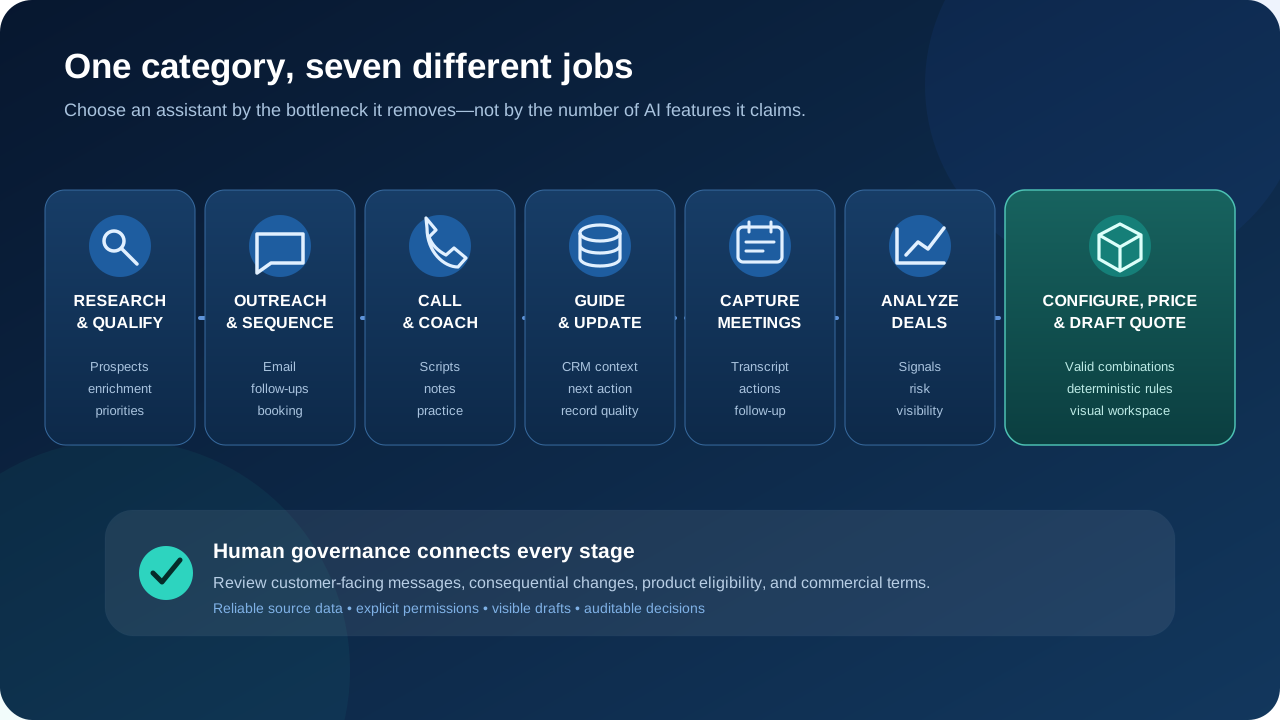
AI sales assistants generally create value in one of three ways. They can expand capacity by completing repetitive work, improve consistency by applying the same process to every record, or reveal patterns across more interactions than one person could review. A credible use case names the expected gain and the exception owner: for example, drafts ready for a representative by the next morning, with ambiguous replies held for review rather than sent onward.
At the top of the funnel, a sales agent may research accounts, identify leads, personalize email, and keep a cadence moving. Around conversations, tools can preserve what happened, surface commitments, and help managers understand performance. In the customer system, they can recommend actions and reduce missing data.
Later in the cycle, context must become an operational decision. Product compatibility, pricing, margin authority, and proposal content demand stronger controls than an internal summary. This is why the same architecture should not be applied indiscriminately from first contact to final offer.
The boundaries can overlap. A calling platform may include research, and a meeting product may contribute deal intelligence. Yet the primary job still matters because it determines the underlying data, interface, implementation work, and success metric. AI sales assistants and AI sales tools should be evaluated where their result will actually be used; the same AI sales assistants may have very different data and approval needs.
7 Leading Tools for Distinct Workflows
The following list is not a ranking. These AI sales tools solve different problems at different stages, so a product suited to high-volume outbound work should not be judged as though it were a conversation analytics platform or a configuration engine.
For each option, we consider its main job, the work it can remove, the likely user, and a practical buying consideration. Packaging and individual feature availability change, so confirm plan details, integrations, limits, and security terms directly with each vendor.
| Product | Primary job | Best suited to | Main consideration |
|---|---|---|---|
| Quortix | Configuration, pricing, and quote drafting | Configurable-product companies | Requires governed catalog and commercial rules |
| Salesforge Agent Frank | Automated account discovery and email outreach | Outbound pipeline generation | Sending policy and approval mode |
| Nooks | Sequencing, calling, research, and skill development | Call-intensive outbound groups | Process fit across channels |
| HubSpot | CRM-centered guidance and execution | Companies using the HubSpot platform | Edition and capability packaging |
| Gong | Conversation and deal intelligence | Revenue organizations with rich interaction data | Adoption, consent, and data coverage |
| Avoma | Meeting capture and follow-up | Meeting-heavy customer-facing groups | Recorder access and integrations |
| Zapier | Cross-application workflow orchestration | Companies with a fragmented technology stack | Workflow ownership and error handling |
Quortix — For AI-Assisted Product Configuration and Quoting
Quortix addresses the post-requirement stage. Once a customer has described what they need, a representative must map those requirements to the current catalog, select an allowed configuration, calculate the right commercial terms, and produce a coherent proposal. That is a different problem from lead generation or meeting capture.
Authorized external AI agent connections use the Model Context Protocol, or MCP. An agent can inspect available data, simulate outcomes, and update permitted catalog, rule, or draft objects. Quortix itself should not be understood as an in-app chatbot, copilot, or conversational interface.
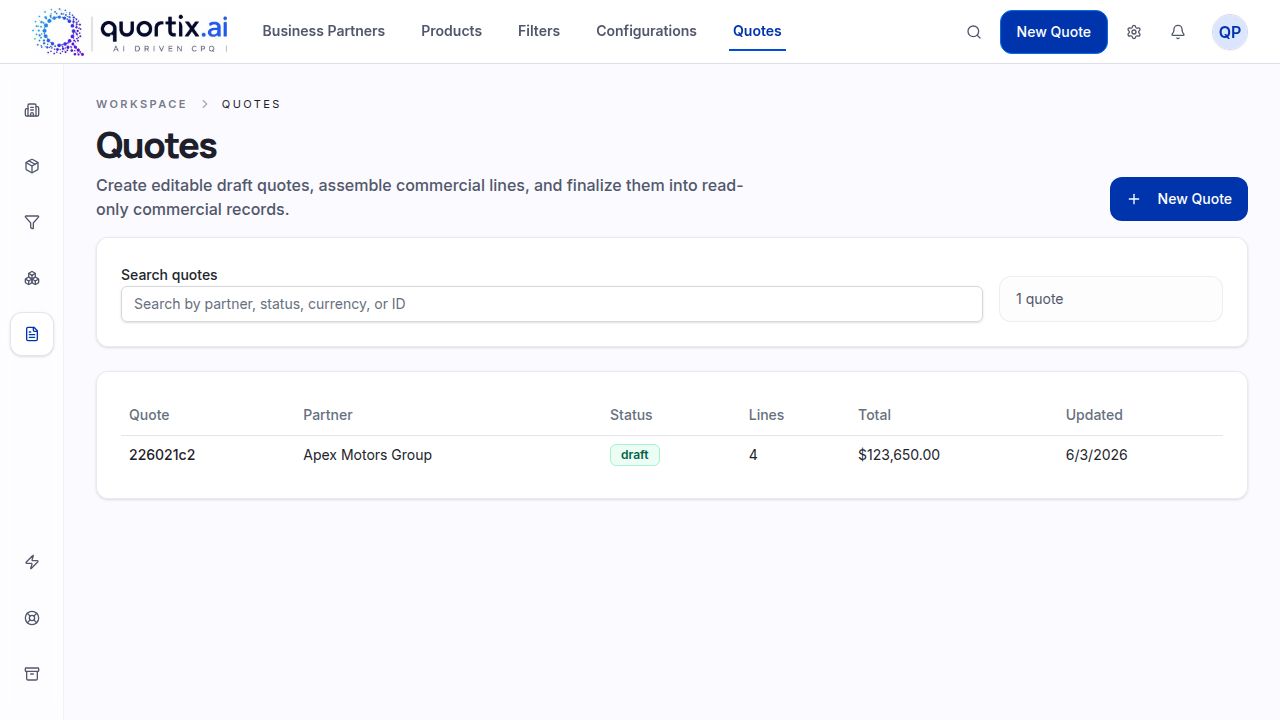
The resulting draft appears in the visual workspace. Published rules execute deterministically when they calculate configured commercial outcomes. This separation keeps product and pricing logic in governed data rather than an opaque prompt.
For consequential review, a representative can inspect the configuration, confirm assumptions, and adjust permitted details before delivery. Organizations that require approval for margin or eligibility decisions should define that operating practice and authority model outside the platform.
Quortix fits businesses with configurable products, numerous options, and nontrivial pricing policy. The key implementation work is preparing the catalog, constraints, commercial rules, and integrations that make the output dependable. It is not intended to replace outbound or conversation sales tools.
Salesforge Agent Frank — For Automated Account Discovery and Outreach
Salesforge presents Agent Frank as an AI SDR for the opening part of the funnel. According to its current product and help pages, Frank can find and process new leads against supplied criteria, conduct email outreach, manage follow-ups, and work toward booked meetings.
The practical value is continuity. Rather than handing research, contact selection, first-touch writing, and follow-up scheduling to separate AI tools, the workflow keeps those jobs together. The tradeoff is concentrated risk: poor criteria or an unsuitable message can propagate through the same chain, so teams need sampling, suppression checks, and a clear pause control.
Salesforge documents both Auto-pilot and Co-pilot modes for Frank. Auto-pilot is designed for greater autonomy; Co-pilot lets a person monitor and approve actions. That choice is relevant when a company wants the efficiency of automation but needs tighter control over brand voice and recipients.
Agent Frank is most relevant when the bottleneck is consistent prospecting and outreach, not analysis after discovery. Buyers should examine data sources, mailbox setup, sending limits, suppression handling, personalization evidence, and how booked meetings and replies synchronize with the customer database.
Nooks — For Lead Identification, Calling, and Skill Development
Nooks is built for outbound groups that combine research with heavy calling. Its current platform brings together AI-managed sequencing, an AI Dialer, signals and intelligence, plus roleplay and scoring capabilities. Those areas cover multichannel engagement, account research, enrichment, prioritization, scripts, notes, and performance development.
The engagement feature supports touches across live conversations, written messages, and social channels. Research and buying signals help prioritize prospects, while personalization can draw from account information and prior interactions. A representative can move from account context to an organized sequence without repeatedly changing applications.
During calling, relevant scripts and note-taking reduce preparation and administration. The call coaching side can score conversations, identify skill gaps, provide scorecards or battlecards, and generate roleplay practice. This makes Nooks broader than a parallel dialer alone.
Nooks belongs on a shortlist where phone-led outreach is central and managers want both execution and skill development in one workspace. Evaluation should use real territories and call patterns rather than a generic call list. Teams should also check number reputation controls, recording consent, sequence governance, and exactly which notes and dispositions are written back.
HubSpot Sales Hub — For CRM-Centered AI Support
The platform takes a customer-record-centered approach. Instead of operating as a narrow standalone application, its capabilities sit beside lead, company, contact, deal, activity, and pipeline records in HubSpot's customer platform.
Current HubSpot materials describe guided selling that prioritizes high-value opportunities and recommends next actions from buying signals. Its account-research agent can research prospects and help craft personalized engagement. Smart deal progression can suggest post-meeting CRM updates, tasks, and follow-up email drafts.
The practical distinction is shared context. Suggested work can remain attached to the record used for lead management, deal tracking, and reporting. That may reduce duplicate records and synchronization work, although it does not remove the need to test custom fields, permissions, and any external data sources.
HubSpot is most suitable when the business already treats its platform as the operational center or wants to consolidate there. Buyers should map each desired feature to the correct edition, seat type, credits, and regional availability rather than assuming every capability comes with every plan.
Gong — For Conversation Intelligence and Deal Insights
Gong is centered on customer interactions and the revenue picture those interactions reveal. Its conversation intelligence captures, transcribes, and analyzes calls, meetings, and written correspondence, turning unstructured dialogue into summaries, searchable evidence, patterns, objections, and next steps.
For representatives, the AI assistant role includes concise context, meeting summaries, recommendations, and help preparing follow-up communication. For managers, the more important feature may be a consistent view across conversations rather than reconstructed notes from individual deal owners.
Gong also connects interaction evidence to pipeline inspection. Its Deal Board materials emphasize visibility across the pipeline and AI-flagged deal risks. That can expose missing engagement, uncertain commitments, or other warning signs early enough for a manager to respond.
This product is relevant when conversations contain evidence that ordinary opportunity fields omit. The value case depends on enough interaction volume, reliable capture, and regular use by representatives and leaders; a group with few recorded conversations may not justify a separate intelligence layer. Recording consent, retention, access, and customer-record alignment require deliberate governance.
Avoma — For Meetings and Follow-Up Automation
Avoma can be viewed primarily as an AI assistant around sales meetings. It automatically records according to preferences and participant consent, produces real-time transcription and AI summary notes, and lets a representative stay focused on the discussion rather than manual documentation.
After calls, Avoma organizes key topics and action items, creates follow-up email drafts, and can save notes to relevant customer-system records. Its official product pages also describe templates, custom note categories, and conversation scoring, which make captured information more consistent across a group.
The distinction from Gong here is one of evaluation focus, not an absolute capability boundary. Avoma is considered as a meeting-lifecycle helper before, during, and immediately after the conversation. Gong is considered as the broader interaction and deal-intelligence layer.
Avoma suits customer-facing groups that lose details or spend too long writing notes after calls. Buyers should test transcript quality for their vocabulary, note templates, action-item accuracy, calendar behavior, consent controls, and whether customer-record updates reach the expected objects and fields.
Zapier — For Connecting AI Across the Commercial Stack
Zapier is not a specialized virtual representative. It is a connective automation layer that passes data and triggers actions across applications. Zapier's current material for revenue work emphasizes lead routing, pre-call research, activity logging, pipeline updates, proposal management, and synchronization across the technology stack.
A workflow might collect a new inquiry, enrich it, assign it to the correct owner, create a CRM record, and notify that person. Another might prepare account context before a call, update a deal after its status changes, or trigger timely outreach while keeping stakeholders informed.
This illustrates a different form of assistance. The product does not need to own the source data or specialize in one funnel stage. It coordinates the applications that already own those jobs and can place an intelligent step inside a defined, observable process.
Zapier is most useful when repeated handoffs between applications are the constraint. The buyer should identify an owner for each workflow, define retry and exception handling, protect credentials, control which fields may be written, and monitor usage as volume grows.
How to Choose the Right Tool for Your Team
The right choice is not necessarily the product with the longest feature list or the most polished demonstration. Start with one observable failure: an unanswered inquiry, an incomplete record, a missed commitment, or a quote returned for correction. Then identify the action and system boundary responsible for it.
A useful evaluation describes the input, desired output, responsible owner, tolerable failure conditions, and approval point. That makes unlike AI sales tools comparable by operational result rather than by broad claims about intelligence. It also prevents a shortlist from mixing a data provider, meeting recorder, orchestration layer, and quoting engine simply because each carries the same category label.
Identify the Main Bottleneck
Map the workflow before selecting a vendor. Measure research time, reply delay, missed actions, incomplete records, quote turnaround, correction rate, or forecast surprises. The baseline should be specific enough to show whether the new feature creates value.
- Weak lead generation → research, enrichment, and qualification support.
- Slow outreach → controlled email and multichannel cadences.
- Lost meeting context → recording, transcription, notes, and follow-up.
- Unclear deal health → conversation and pipeline intelligence.
- Slow complex offers → governed configuration, pricing, and quote drafting.
Keep the first use case bounded. A pilot that covers one segment, workflow, or catalog family is easier to assess than an instruction to automate everything. It also reveals exceptions before the company attempts to scale.
Check Your Existing Systems
List every system that supplies context or receives output: customer records, email and calendar, call platforms, data providers, product catalogs, ERP data, proposal systems, and identity services. Then identify which one remains authoritative for each field.
A feature that reads a record is not necessarily able to write back safely. Test ownership rules, duplicates, deleted records, delayed sync, rate limits, custom objects, and permissions. Confirm that failed actions create an explicit error and an accountable route for recovery.
For an AI-enabled workflow, context quality sets an upper bound on result quality. Stale price lists produce stale proposals; incomplete account history produces weak recommendations. Data preparation is part of implementation, not a separate concern to postpone.
Validate Real-World Exceptions Before Rollout
A convincing demonstration usually follows a clean, expected path. A useful evaluation should also include the conditions that make day-to-day work difficult: incomplete inputs, conflicting information, a changed owner, duplicate contacts, a missing catalog item, or a request that falls outside policy.
Build a small set of representative cases before rollout. Include an ordinary case, ambiguous language, stale source data, an action that should be escalated, and one that must be rejected. Define the expected disposition before the test, compare the proposed output with approved policy, and record both corrections and false escalations.
This exercise clarifies whether the product is ready for a broader business process or needs tighter inputs and guardrails. It also gives the implementation owner a practical acceptance standard instead of relying on a subjective impression after a short pilot.
Plan for the recovery path as carefully as the happy path. Users need to know how to stop a workflow, correct an incorrect result, recover from a failed connection, and find the evidence that explains what happened. Clear ownership turns an exception into routine operational work rather than an urgent investigation.
Decide How Much Autonomy AI Should Have
Separate low-consequence actions from consequential ones. Research, internal summaries, and draft notes can often run with lighter supervision. External messages, record deletion, eligibility decisions, discounts, and contractual content usually require stronger approval and audit controls.
Define autonomy at the action level rather than for the whole product. An agent may draft an email but wait for approval before sending; it may prepare a field update but require confirmation before overwriting the source of truth. The human should see evidence, proposed change, and downstream effect.
The same rule applies to the configuration and pricing stage. Language models can interpret requirements and produce a first draft, while deterministic rules validate combinations and commercial logic. A person completes the final review before a consequential change or customer-facing proposal.
Consider Ongoing Administration
Ownership continues after launch. Someone must maintain prompts, workflow rules, integrations, access, templates, data mappings, and evaluation sets. The owner also needs a process for vendor changes and a channel through which representatives can report an unreliable feature.
Measure quality as well as activity. More messages, summarized interactions, or generated drafts do not prove value. Choose measures tied to the selected workflow: accepted recommendations and corrected fields for administration; positive replies and suppression errors for outbound; or quote corrections, cycle time, and exception frequency for governed offers.
Commercial comparison should include subscription, usage credits, implementation, data, integration maintenance, security assessment, and employee administration. Some platforms are inexpensive to start but costly to operate if every exception needs a specialist.
Conclusion
There is no universal best AI product for every revenue stage. Agent Frank concentrates on automated engagement; Nooks combines multichannel outbound work, calls, and development; HubSpot keeps assistance close to customer records; Gong analyzes interactions and deals; Avoma supports the meeting lifecycle; and Zapier connects existing systems.
If the main problem begins after customer requirements arrive—when a configuration, governed pricing, and proposal must be produced—another outreach or meeting product will not address it. A specialist such as Quortix lets authorized external agents connect over MCP, places draft work in a visual workspace, and runs published rules deterministically. Teams can make human review part of their delivery practice.
A defensible shortlist has one product category per measured bottleneck, reliable source data, an explicit approval boundary, and an owner who can maintain the workflow. Run the same ordinary, ambiguous, and prohibited cases through each finalist before comparing commercial terms. To assess Quortix for complex configuration and quoting, contact the Quortix team.