
Best Sales Quoting Software: 7 Tools for Faster, More Accurate Quotes
Compare seven quoting tools for document creation, guided selling, product configuration, pricing, approvals, e-signature, and interactive proposals.

Preparing a commercial offer becomes difficult when a seller must search for current prices, check discount authority, confirm that products work together, request approval for unusual terms, and copy data between spreadsheets and customer systems. The document may look simple, but the work behind it is often fragmented.
Quoting products automate different parts of that problem. Some focus on creating, sending, and signing polished quotes and proposals. Others calculate the offer itself by selecting a valid configuration, applying pricing rules, and controlling exceptions before the document is generated.
This guide compares seven options for different business models and levels of complexity. It explains what each tool does, which business requirements it fits, what to consider before implementation, and how vendors generally structure pricing. The order is not a ranking from strongest to weakest.
What Is Quoting Software?
Quoting software is a system for creating and managing commercial quotes. At a basic level, it can combine customer details, line items, quantities, taxes, terms, and branding into a document. More advanced products can pull catalog data, calculate a price quote, route an exception for approval, collect an electronic signature, and record acceptance.
The category therefore covers a wide range. Simple quotation software replaces a spreadsheet and document template. Proposal software adds design, engagement tracking, and e-signature. A CPQ platform goes deeper by validating product combinations and calculating governed pricing before producing the customer-facing output.
“The visible document is only the final step. The real selection question is how much logic must be correct before that document can be sent.”
The right quoting product is not necessarily the one with the longest feature list. Locate the first point where the current process fails: selecting a valid bundle, calculating a term, obtaining approval, building the document, or collecting acceptance. That failure tells you which product category belongs on the shortlist.
Quoting Software vs. CPQ Software
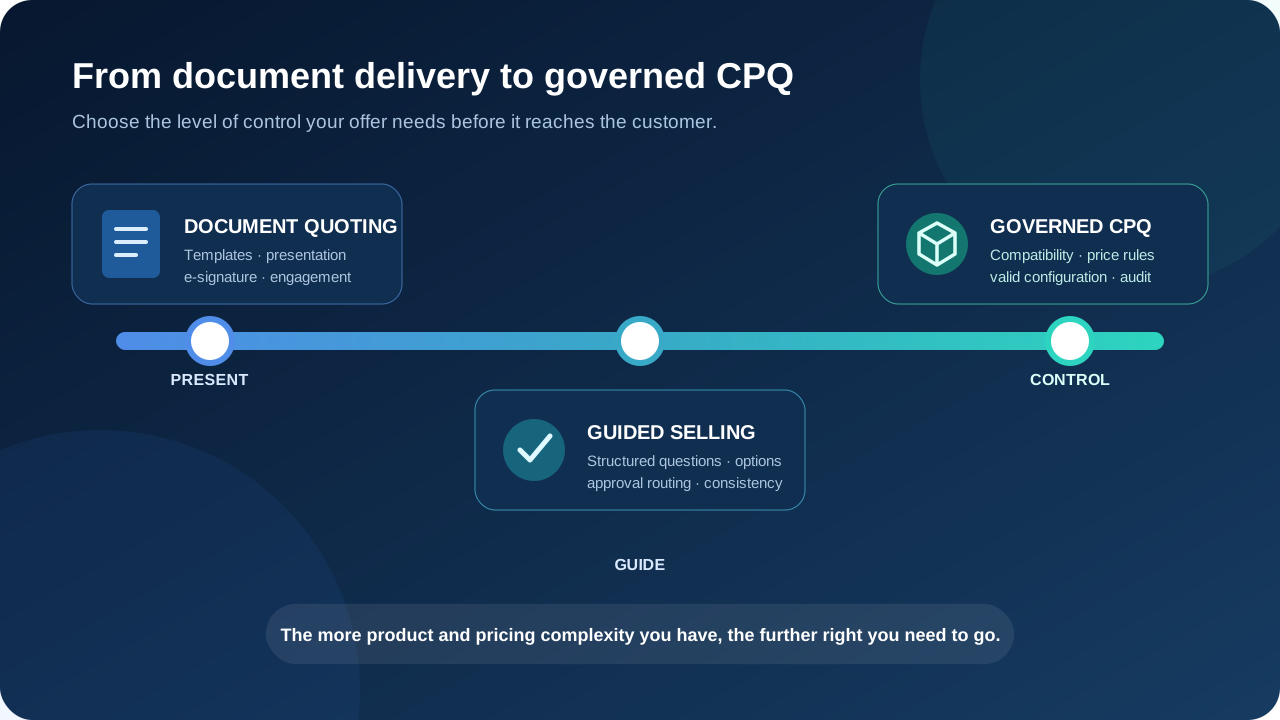
The terms are often used together, but they are not fully interchangeable. General quoting software usually starts with known products and prices, then helps a user assemble and deliver the offer. CPQ—configure, price, quote—starts earlier, when the correct products and the correct commercial terms still need to be determined.
Consider a design agency offering three fixed service packages. A document-oriented tool can insert the selected package, optional services, and payment terms into a branded page. Now consider an equipment manufacturer with hundreds of components, compatibility constraints, regional lists, and volume discounts. That process needs an engine that prevents invalid combinations and calculates the result using controlled rules.
| Criterion | Document-oriented quoting | CPQ |
|---|---|---|
| Primary job | Create, present, send, and sign an offer | Configure a valid offer, calculate terms, then generate it |
| Product complexity | Standard products and services | Options, bundles, dependencies, and constraints |
| Pricing | Fixed or manually selected values | Rules, lists, discounts, promotions, and deal context |
| Error control | Templates and user checks | System-enforced configuration and pricing rules |
| Choose when | Speed and presentation are the main problem | Commercial accuracy is the main problem |
The boundary is not absolute. Many quoting tools add product tables, optional items, and approval features, while modern CPQ products improve document presentation. When quoting software spans both sides, buyers should evaluate the underlying workflow rather than relying on the category label.
7 Best Quoting Tools for Different Workflows
Each tool below addresses a different part of producing quotes and proposals. Use the same evaluation logic for every option: what it is, which task it solves, who it fits, what requires caution, and how the commercial model is structured.
Quortix — For AI-Native CPQ and Complex Quoting
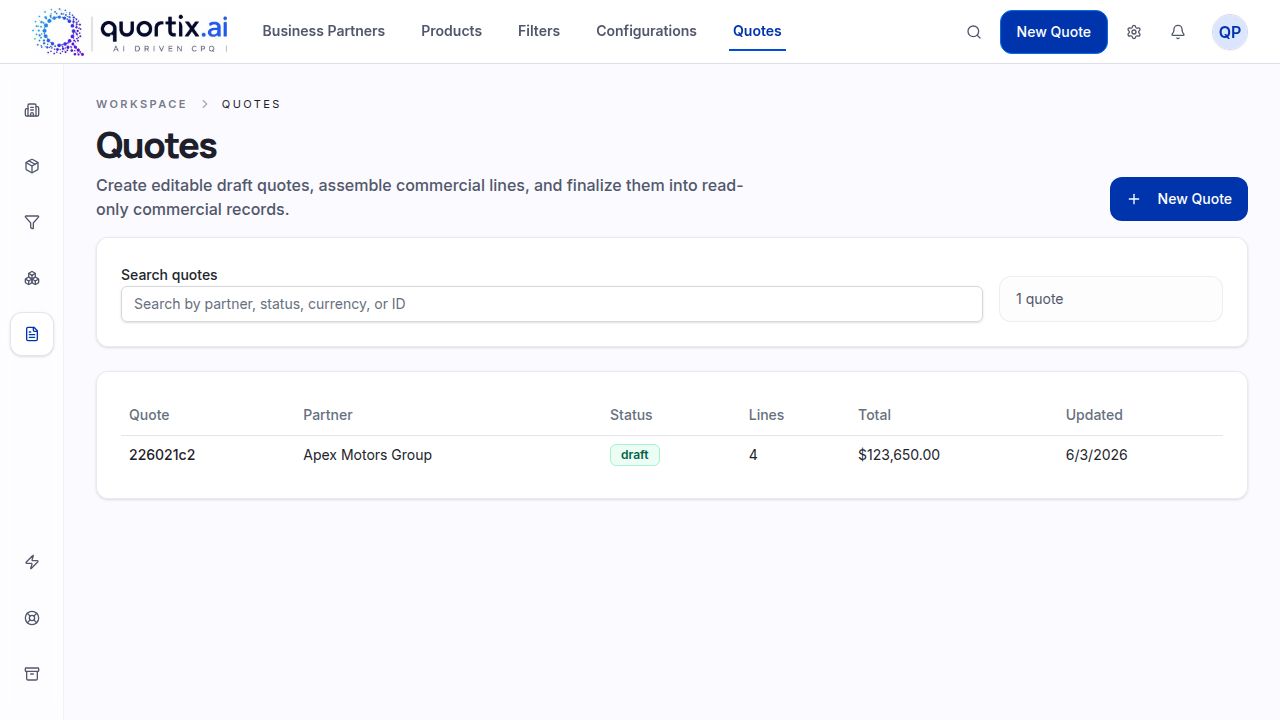
Quortix is designed for companies that need to calculate the offer, not merely format it. The platform centralizes products and variants, compatibility rules, configuration fields, price catalogs, pricing logic, promotions, and proposed quotes in a visual workspace.
Authorized external AI agents connect through the Model Context Protocol (MCP). Using the governed domain, an agent can inspect data, simulate outcomes, and update permitted catalog, rule, or draft objects; proposed work is visible in the workspace. Published rules execute deterministically. Buyers who require review of consequential changes or customer-facing quotes should define that operating practice.
The tool fits configurable equipment and other complex offerings where invalid combinations or incorrect terms create costly downstream work. Quortix is in active development: formal approval workflows and packaged CRM or ERP integrations are roadmap items, so buyers needing those features immediately should confirm availability. Pricing follows tiered SaaS packaging, with the proposal and its rules kept as structured data.
Salesforce Revenue Cloud — For Enterprise Revenue Management
Salesforce Revenue Cloud, now positioned within Agentforce Revenue Management, is a broad revenue-lifecycle solution for organizations already using the Salesforce ecosystem. It connects catalog, configuration, pricing, discounting, proposal generation, quotes, contracts, orders, and related opportunity data.
Its strongest advantage is context: the quoting process can use governed account and opportunity information without creating another disconnected record. The same breadth also means implementation, data modeling, permissions, testing, and administration are more involved than with a narrow document tool.
This platform suits a large business that wants enterprise revenue management around its existing Salesforce foundation. Features and capacity are packaged across editions and add-ons; total cost should include implementation partners and ongoing administration, not only licenses.
DealHub — For Guided Selling and Complex Quotes
DealHub combines guided selling with CPQ and a digital buyer experience. A seller can follow structured questions, select products under configuration rules, apply governed pricing and discounts, build the proposal, and route non-standard conditions through approval steps.
The tool is a good fit when a company wants a more controlled process for complex quotes rather than a free-form editor. Its features also extend into contract and subscription workflows, so scope should be defined carefully before implementation.
DealHub generally uses custom pricing based on requirements and scale. Buyers should assess integration depth, rule ownership, and how easy it will be for internal operations teams to maintain the solution after launch.
Conga CPQ — For Complex Product Configuration
Conga CPQ focuses on configuring complex products and services within a controlled commercial workflow. Guided selection, compatibility rules, catalog and pricing controls, proposal generation, and routing help teams turn customer needs into consistent quotes.
The tool is relevant when the main risk is choosing an invalid product combination or applying the wrong commercial conditions. Conga offers multiple CPQ products and deployment patterns, including Salesforce-oriented and CRM-agnostic options, so architecture fit matters during evaluation.
Pricing is typically custom. Buyers should identify which product family matches their use case, which integrations are required, and who will own configuration after implementation. The features are extensive, but that depth can require specialist administration.
PandaDoc — For Document-Based Quotes
PandaDoc is primarily a document workflow product. Document-focused quoting software helps users build branded templates, insert product and pricing tables, request internal approval, send the proposal, collect e-signatures, and monitor recipient activity. Optional items can give a buyer limited choice inside the document.
PandaDoc belongs on a shortlist when the main need is creating attractive sales quotes and sales proposals, then sending them quickly. It also connects to common customer systems and can populate document fields or quote sections using existing deal data. Buyers should still verify the exact connector fields and approval behavior they require.
PandaDoc is not a substitute for deep configuration logic or multilayer pricing. Small businesses may find its published subscription tiers more accessible and affordable than enterprise CPQ, but advanced features, integrations, and API usage can affect the final cost.
QuoteWerks — For Traditional Quote Creation
QuoteWerks is a specialized quote creation and management software product with a long-standing desktop offering and a newer web option. It supports product lists, calculations, templates, revisions, purchasing-related workflows, and connections to customer management systems.
The tool suits organizations that want a familiar, structured way to produce and track quotes without adopting a broader revenue platform. Existing users may value continuity with established proposal templates, histories, and internal processes.
Its approach differs from newer agent-led or visual CPQ products. Buyers should compare desktop and web capabilities, connector coverage, and maintenance requirements. QuoteWerks publishes several editions, including a Pro edition, making entry cost easier to assess than custom-priced enterprise products.
Qwilr — For Interactive Web-Based Proposals
Qwilr turns the commercial offer into an interactive web page. Teams can create reusable blocks, branded layouts, dynamic pricing sections, optional choices, e-signature, payments, and engagement analytics. Buyers can open and accept the proposal without downloading a static attachment.
The cloud-based tool is oriented toward presentation and buyer interaction. Its API can generate pages from a central data source and reconcile selected quote options after acceptance, which can support repeated document production when the source data and option mapping are already controlled.
Qwilr is a candidate for polished quotes and proposals, but it is not intended to govern a deeply configurable catalog. Published subscription tiers make the starting cost visible; teams using API generation, advanced security, or larger volumes should evaluate the relevant plan.
How to Choose the Best Quoting Software
Do not choose by counting features or comparing the lowest advertised cost. Map one recent offer from request to acceptance: note every re-entry, spreadsheet lookup, approval wait, correction, and downstream handoff. Separate document problems from calculation problems before comparing vendors.
Evaluate Your Product Complexity
List variants, bundles, dependencies, required accessories, quantity limits, and regional restrictions. If users must remember which products work together, a document editor is unlikely to be enough. Give each finalist the same valid configuration, invalid combination, incomplete request, and discontinued item; record whether it blocks, warns, or silently accepts each case.
Review Your Pricing Rules
Document volume discounts, customer-specific values, promotions, special conditions, effective dates, currencies, and multiple lists. Ask whether the platform calculates them or only displays values supplied by a user. Test a boundary quantity and an expired promotion; the distinction determines whether the system prevents an error or simply presents it well.
Identify Your Approval Requirements
Define which discounts, margins, payment terms, or legal changes need approval and how many people participate. Review whether routing is automatic, whether approvers see enough context, and whether the final proposal records the approved state.
Check Your Existing Systems
Identify the authoritative sources for customer, catalog, inventory, cost, and contract information. Then verify whether a connector reads and writes the fields you need, in the needed direction and at the needed time. Test a failed sync and duplicate record. An integration logo is not proof that the complete workflow is supported.
Consider Implementation and Maintenance
Ask who will configure the initial catalog and who can change products, pricing rules, templates, and permissions six months later. An easy launch can still create long-term dependency if every adjustment requires a developer or consultant.
- For simple presentation: prioritize templates, e-signature, and buyer experience.
- For controlled commercial logic: prioritize configuration, pricing rules, and auditability.
- For long-term ownership: prioritize an administration model your own team can maintain.
Conclusion
The selection process should begin with the complexity behind the offer, not with a list of brands. PandaDoc and Qwilr emphasize document experience; QuoteWerks provides traditional quote management; Salesforce, DealHub, and Conga address broader revenue or CPQ workflows.
When the difficult part is configuring products and applying governed terms, shortlist systems that show how rules handle invalid work before it reaches the customer. For that use case, Quortix lets authorized external agents inspect data, simulate outcomes, and update permitted objects over MCP; the work is shown in the visual workspace and published rules run deterministically. Teams can add their own review practice for consequential changes and delivery. To discuss fit and current feature availability, contact the Quortix team.